
If your practice uses Open Dental, you can apply a payment to specific procedures before you take it. Crown then posts the payment to those procedures in Open Dental for you. You can allocate procedures on terminal payments, virtual terminal payments and payment requests.
Note:
Allocating procedures is currently available only for practices using Open Dental.
Choose procedures
- On the patient's Terminal Payment, Virtual Payment or Payment Request tab, select Allocate Procedures.
- Choose which procedures to show:
- Complete: completed procedures.
- Active Treatment Plan: procedures on the patient's active treatment plan.
- All: both.
- Family: include procedures for the patient's family members.
- Check Pay on each procedure to include. The To Apply amount fills in with the procedure's remaining amount. To apply a different amount, edit it and save.
- Check Total to Apply, then select Allocate Procedures.
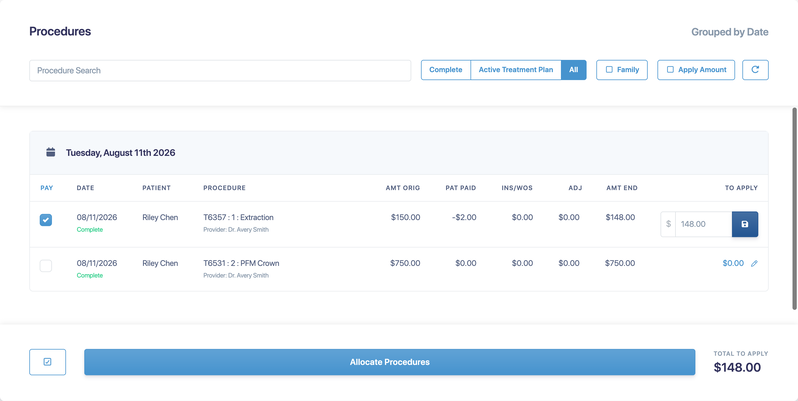
The payment amount changes to the total you allocated, and the field is labeled Allocated Amount. Use the search box to find a procedure by code or description. Select the refresh button to reload procedures from Open Dental.
How allocated payments post
- Payments for completed procedures post to those procedures.
- Payments for treatment-planned procedures post as a prepayment.
- If a terminal payment is split across cards, it posts as a prepayment, and you'll need to allocate it manually in Open Dental. If the approved amount is different from what you sent, it posts as unallocated.