
How you reverse a payment depends on how long ago it was taken:
- Before your close of day: void it in Crown.
- After your close of day, up to 180 days: refund it in Crown.
- Older than 180 days, or not processed through your GoDaddy merchant account: issue a non-reference refund.
Void or refund a payment in Crown
- Select Transactions in the left menu, then find the payment.
- Select ... on the payment's row.
- Select Void or Refund.
Your close of day is set in your GoDaddy merchant account. To check it, sign in at commerce.godaddy.com and go to Settings, then Payouts. It's shown under Close of Day.
Good to know
- We recommend issuing voids and refunds in Crown. If a void or refund is processed on the terminal or in your GoDaddy merchant account instead, it syncs back to Crown within about a minute.
- Crown supports one partial refund per payment. To issue more than one partial refund on the same payment, refund it in your GoDaddy merchant account. Crown picks up the refund and shows it on the payment. See GoDaddy's guide to issuing a refund.
Issue a non-reference refund
A non-reference refund isn't tied to an original transaction, so you enter the patient's card details yourself. Use it for payments older than 180 days, or payments that weren't processed through your GoDaddy merchant account. You can issue one on your terminal or from a web browser.
On your terminal
Note:
This option is only available to terminal users with Owner permissions.
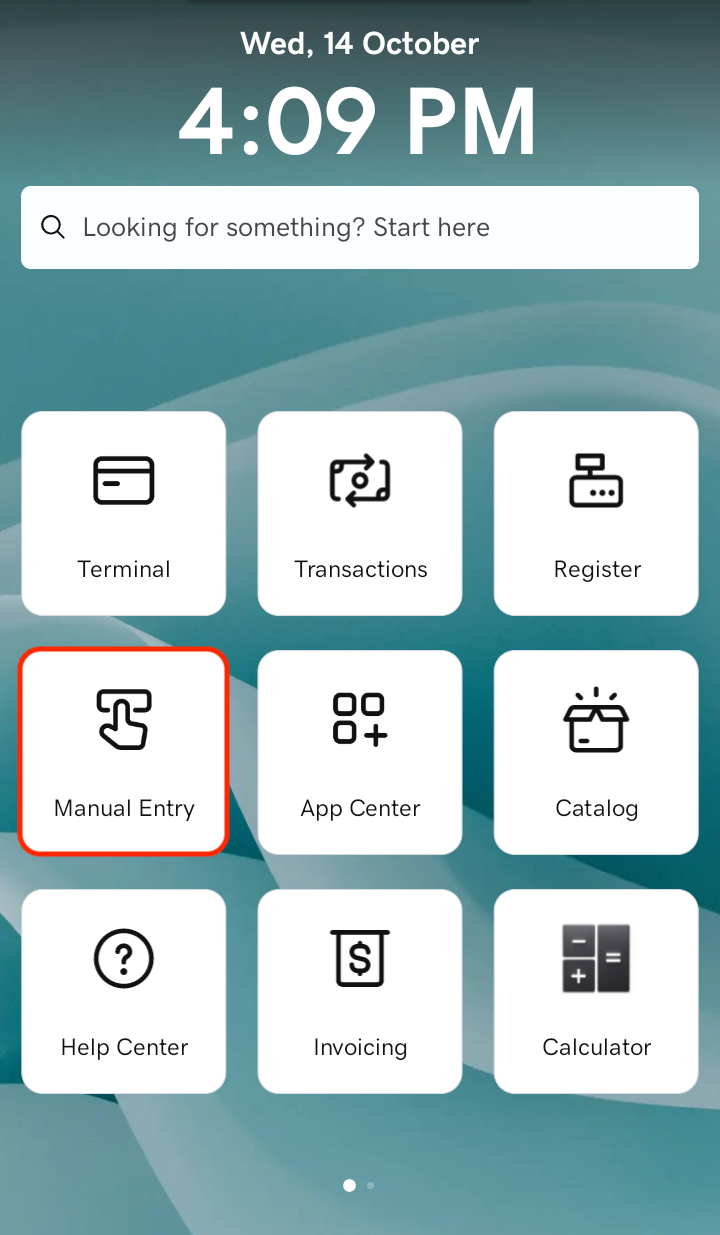
- Tap the Manual Entry tab on the terminal's home screen.
- From the drop-down menu, choose NON-REF REFUND.
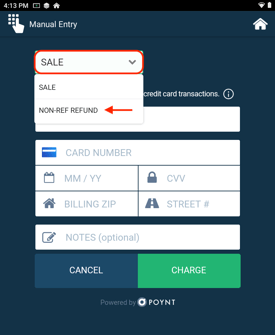
- Enter the refund amount, card number, expiration date, CVV and billing ZIP code. Street number isn't required.
- Tap Refund.
From a web browser
Not near a terminal? Issue the refund from your GoDaddy merchant account.
- Go to the dashboard where you manage your GoDaddy merchant account.
- Select Virtual Terminal in the left menu.
- From the drop-down menu, select Non-ref refund.
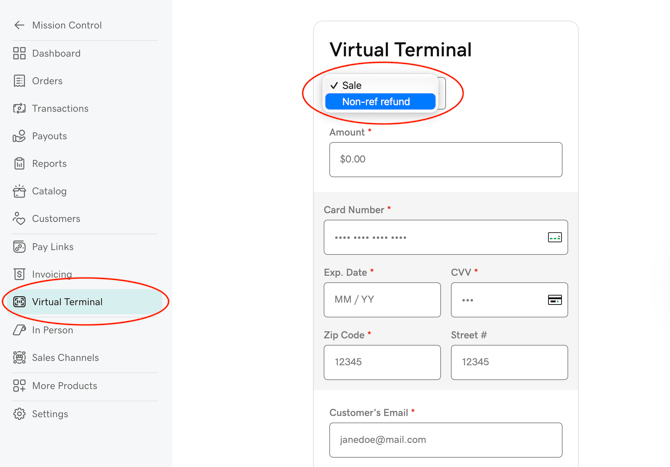
- Enter the refund amount, card number, expiration date, CVV, billing ZIP code, and the patient's email and phone number. Street number isn't required.
- Select Refund.
Note:
If you don't see the non-reference refund option in the drop-down menu, contact us to have it turned on for your account.