
Crown Connect posts payments to your practice-management system: Open Dental, Dentrix or Eaglesoft. If Crown can't reach it, payments won't post automatically. This is usually caused by the server that hosts your practice-management system, or by the services that connect it to Crown.
Note:
Payments aren't lost. Once the connection is restored, you can retry posting them from Crown.
Signs of a connection issue
- Payments taken in Crown don't appear in your practice-management system.
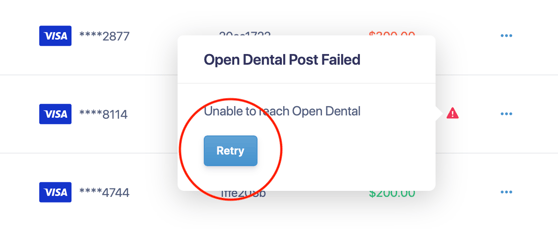
- A red indicator shows next to the payment in Crown.

Restore the connection
First, make sure the server is on. The computer that runs your practice-management system, usually your server or main workstation, should be powered on, connected to your network and not asleep. Then follow the steps for your system, checking after each one whether new payments are posting.
Open Dental
- Check the eConnector. In Open Dental, go to eServices > eConnector Service. The status should be Working. If it shows Failed, select Ack. If it shows Stopped, select Start.
- Restart the Open Dental services. On the server, press Windows + R, type services.msc and press Enter. Restart Open Dental eConnector and API Service.
- Restart the server. If the connection still isn't working, restart the server and wait a few minutes for Open Dental and its services to start.
Dentrix and Eaglesoft
- Restart the Moolah service. On the server, press Windows + R, type services.msc and press Enter. Find the Moolah service, right-click it and select Restart.
- Contact support. If payments still aren't posting, chat with us in Crown and we'll help.
Retry the payment in Crown
Once the connection is back, hover over the red indicator next to the payment and select Retry. Crown posts the payment to your practice-management system.
Still having trouble?
If payments still aren't posting after you've worked through these steps, chat with us in Crown and we'll help.