
The Payment Plans page lists your practice's active payment plans, with the next payment, balance, past-due amount and progress for each.
Open the list
Select Payment Plans in the left menu.
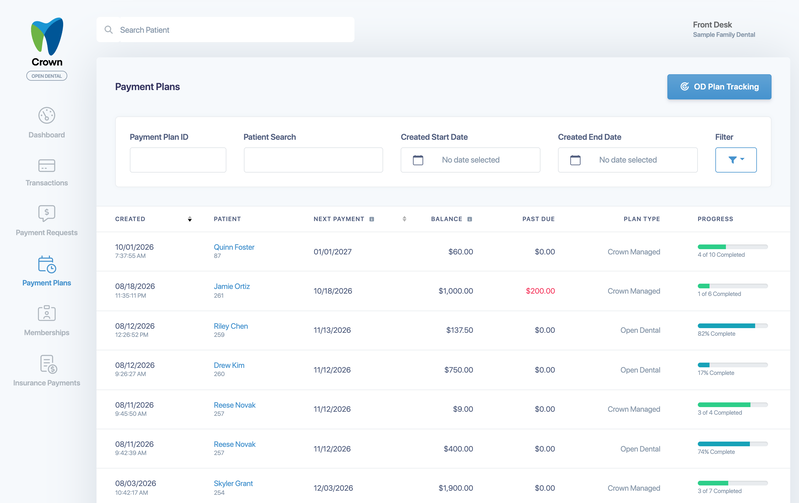
Each plan shows:
- Created: when the plan was created.
- Patient: the patient's name and ID.
- Next Payment: the date of the next scheduled payment.
- Balance: the amount left to pay.
- Past Due: the amount from missed payments.
- Plan Type: Crown Managed or Open Dental.
- Progress: how many payments have been made, or the percentage paid for Open Dental plans.
Sort by Created or Next Payment by selecting the column heading. Select a plan to open it. See Manage a patient's payment plan.
Search and filter
- Search by Payment Plan ID or patient, or choose a Created Start Date and Created End Date.
- Select Filter to choose:
- Status: Active, Complete or Canceled.
- Plan Type: Legacy, Crown Managed or Open Dental.
- Balance: Past Due Only.
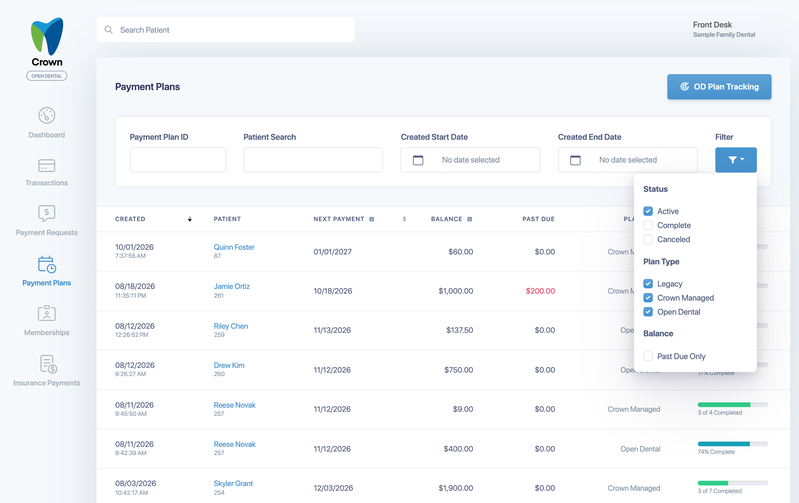
The list shows Active plans when it opens. Use Filter to include Complete or Canceled plans.
Use Past Due Only to find plans that need follow-up. It doesn't currently include Open Dental plans, so check the Past Due column for those.