
Memberships let your practice offer in-house plans that patients pay for monthly or yearly through Crown Connect. Crown handles enrollment, the signed agreement, recurring billing, reminders, renewals and, if you use Open Dental, posting payments and keeping discount plans in sync.
Using Crown Connect for a non-dental business? Wherever these articles say "patient," you'll see "customer."
Where to find everything
- See every membership, search, filter and export: Memberships in the left menu
- Enroll a patient: The patient's profile, then the Membership tab
- Take a payment, pause, cancel, change a card or renewal: Open the membership, then Manage Plan
- Create or edit plans, change plan prices: Membership Administration in the menu at the top right
- Reminders, declined payments, discounts, Open Dental posting: Settings in the menu at the top right, then Memberships
- Edit the membership agreement: Settings, then Memberships, then Agreement
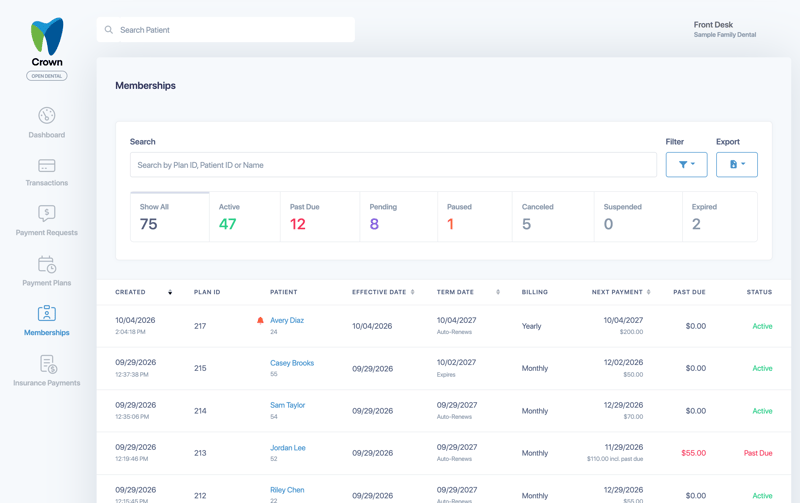
Membership statuses
- Active: The membership is in good standing and billing on schedule.
- Past Due: A payment was declined or not yet collected. The membership is still active and builds a balance until it's paid. If you've turned on suspension, it's suspended after your grace period.
- Pending: The enrollment was created but hasn't been completed yet, for example when the patient still needs to sign and pay.
- Paused: Billing is stopped until you resume it. Any past-due balance is still owed.
- Suspended: The membership stopped after a declined payment and the grace period ended. You can restart it.
- Canceled: The membership was canceled. You can restart it.
- Expired: The membership reached its term date and was set not to renew.
What's new in the October 2026 release
Memberships were redesigned and now run on a rebuilt billing engine. Highlights:
- New Membership Settings for declined payments, grace periods, multi-patient discounts and payment splits. See Set up your Membership Settings.
- A better-organized enrollment form with End After, Enrollment Fee, Months Collected Upfront, and card, cash or check payments. See Enroll a patient in a membership.
- A new membership list with status tiles, one search box, filters and PDF or CSV exports. See Find, filter and export memberships.
- Plan price changes you can schedule and apply to the members you choose. See Change a plan's price for existing members.
- Every member action in one Manage Plan menu, plus a Change History tab. See Manage a patient's membership.
- A clearer membership agreement, emailed to patients as a PDF. See Customize your membership agreement.
Start here
Take a few minutes to review your Membership Settings. Suspend After Declined Payments is turned off for every practice with this release, so past-due memberships stay active and keep building a balance until you decide otherwise.
All Memberships articles
- Set up your Membership Settings
- Customize your membership agreement
- Create and edit membership plans
- Change a plan's price for existing members
- Enroll a patient in a membership
- Manage a patient's membership
- Find, filter and export memberships
- Past-due memberships, payments and restarting
- Memberships and Open Dental
- Memberships FAQ